
How to Share Bible Verses on Instagram
A verse that lands on a Sunday is worth passing on, and Instagram is where much of that sharing happens. But a cropped screenshot of a Bible app or a blurry photo of the page does the verse no favors. To share Bible verses on Instagram well, you need two things: an image sized so Instagram does not crop or shrink it, and type set so the words can be read in the second someone gives them. Both are easy once you know the numbers. Here is the practical part first, then a faster way to make the card.
What size should a Bible verse image be for Instagram?
Instagram treats each format differently, so start by deciding where the verse will live:
- Square feed post: 1080 by 1080 pixels. The safe default, and it reads well on your profile grid.
- Portrait feed post: 1080 by 1350 pixels, a 4:5 shape. It fills more of the screen as people scroll, which gives a verse more room to land.
- Story: 1080 by 1920 pixels, the full 9:16 screen. Keep the words in the middle band, because Instagram lays its own interface over roughly the top and bottom couple hundred pixels, and text placed there gets covered.
If you only make one image, make the square. It posts to the feed as is and drops onto a story background without cropping. Whatever the size, export at full resolution: Instagram compresses every upload, and a small image scaled up turns soft.
How do you make a verse image people can actually read?
On a fast-moving feed, a verse gets about a second to earn a pause. Every choice below serves that one second:
- One verse, not three. If the whole passage matters, put the key line on the image and the rest in the caption.
- Big type. A good test is to shrink the image to a thumbnail: if you cannot read it there, the type is too small.
- Strong contrast: dark text on a light ground or the reverse. Text laid over a busy photo is the most common failure. If you want a photo background, darken it or set the text in a solid block.
- Short lines, roughly four to eight words, broken where the phrases break. A verse set like poetry reads better than a verse set like a paragraph.
- Plain type for the verse itself. Ornate script is hard to read at phone size; if you love it, save it for the reference line.
- Always include the reference, like Romans 8:28, so a reader can go look it up.
None of this is about dressing scripture up. It is about respecting both the words and the reader's attention enough to make them legible.
Sharing a line from the sermon, not just a verse
Some of the most shareable moments are not verses at all, they are a sentence the preacher said that crystallized the whole message. Those lines are easy to lose if you did not write them down. If you have the message captured, you can go back to the exact wording and turn it into a card. There is a guide on how to find the Bible verses mentioned in a sermon if the reference slipped past you too.
Pairing a sermon quote with the verse it was drawn from makes an even stronger post: the truth and its source, together, in one clean image.
Should you post it to your story or your feed?
A story is casual and gone in a day, which makes it the right home for a verse of the day or a quick word from Sunday's message. A feed post is permanent and shows on your grid, so save it for the lines you want to stand behind. Either way, add one sentence of your own in the caption about why the verse moved you. A verse with a reason attached starts conversations; a bare graphic mostly collects likes.
Shared this way, a private moment on Sunday becomes an encouragement someone else scrolls past on Tuesday.
Step by step
Choose the verse or quote
Pick the verse or the sentence from the sermon that moved you, while the exact wording is still fresh.
Set it on a clean card
Large type, strong contrast, short lines, and the reference included, in a shape that fits a square post or a story.
Save or share the card
Save the card to your camera roll or send it straight to Instagram from the share sheet.
Post it with a line of your own
Add one sentence in the caption about why it moved you, then post to your story or your feed.
Turn what moved you into a card
Sunday Notes AI turns a line that stood out into an insight card ready to share. Pick a verse the message rested on, with its King James text already looked up, or a sentence the preacher said, and the app sets it on a clean card in readable type.
Save the card to your camera roll or send it straight to Instagram and other apps from the share sheet. The verse or quote that moved you on Sunday becomes something you can pass on the same day, without wrestling with a design app.
Get the app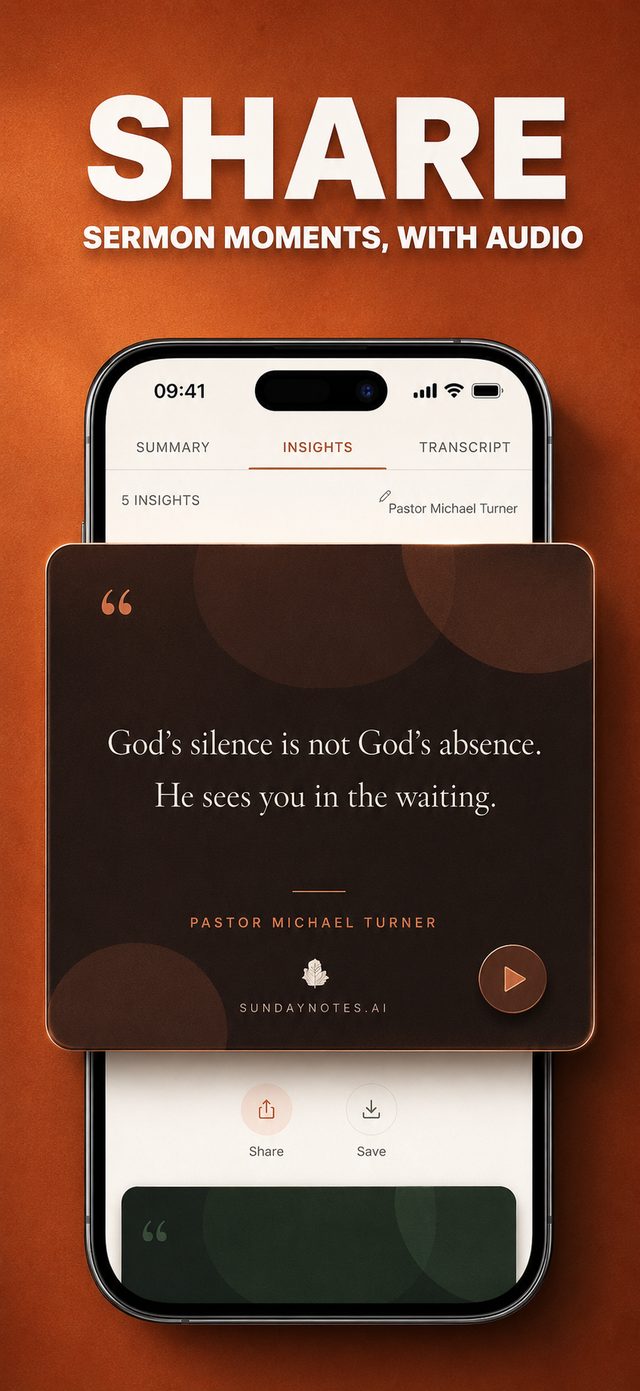
Common questions
What size should a verse image be?
1080 by 1080 pixels for a square post, 1080 by 1350 for a portrait post, 1080 by 1920 for a story. Keep the type large and the contrast strong: if you cannot read the image as a thumbnail, the type is too small.
Do I need permission to post a Bible verse?
For a single verse with its reference, generally no. The King James Version is centuries old and free to share, and most modern translations allow quoting individual verses with attribution, though each publisher sets its own policy. Including the reference is both good manners and good practice.
Can I share a quote from the sermon, not just a verse?
Yes, and those lines are often the most shareable. A sentence that crystallized the message works well on its own or paired with the verse it was drawn from, truth and source together in one image.
Do I need a design app to make a verse card?
You can use one, but it is slow if you want to share the same afternoon. A tool that turns a verse or quote into a clean card in a few taps lets you post while the message is still fresh.
Keep reading
More guides that go with this one: how to find bible verses mentioned in a sermon, how to remember a sermon, digital sermon journal. Or head back to the Sunday Notes AI home page to see how the whole app fits together.